Version 1.0.0 · ZIP · Chrome, Edge, Brave and other Chromium browsers
Episode title
Norwegian
1080p
English
Download
Install
Unzip it somewhere permanentUnzip vod-dl-1.0.0.zip into a folder you'll keep, such as Documents. Chrome loads the extension from that folder, so don't delete or move it later.
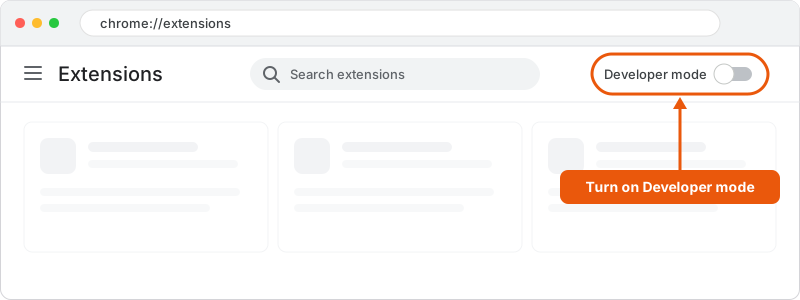
Open the extensions pagePaste chrome://extensions into Chrome's address bar. Browsers don't allow web pages to link there directly.
Turn on Developer modeUse the switch in the top right corner.
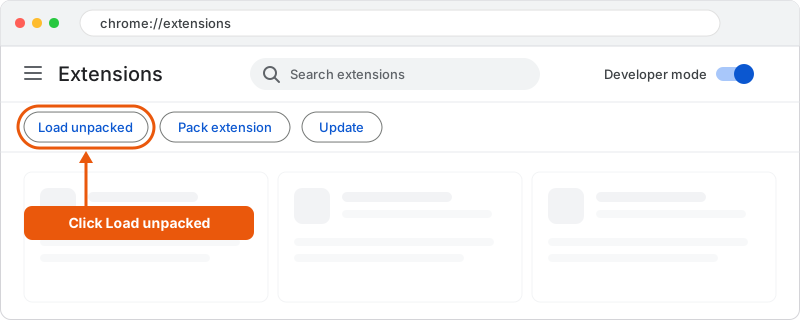
Load the extensionClick Load unpacked, which appears once Developer mode is on.
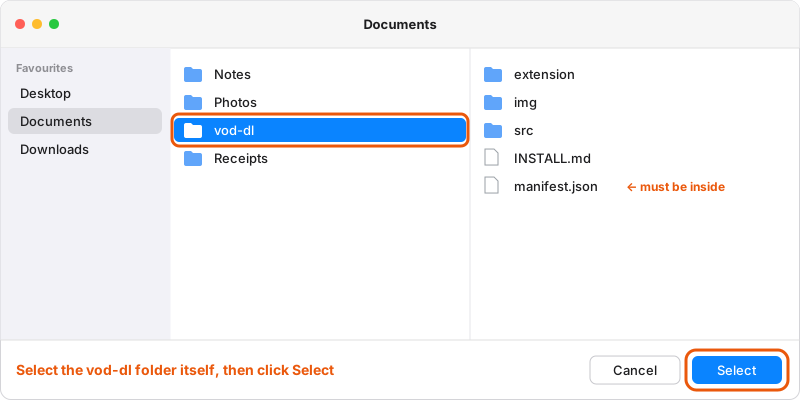
Select the vod-dl folder itself, the one containing manifest.json, then click Select.
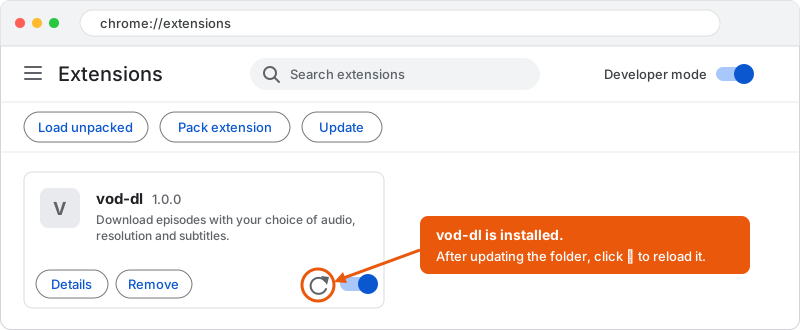
The vod-dl card appears on the page.
Pin itClick the puzzle-piece icon in the toolbar and pin vod-dl.
Use
Open an episodeLog in to the video site in Chrome and go to an episode page.
Pick your optionsClick the vod-dl icon, then choose audio, resolution and subtitles.
DownloadA tab opens and shows progress. Keep it open until it says Done. Files land in your Downloads folder.
If the popup shows an error, reload the episode page and try again.
Update
Download the new ZIP, replace the contents of your vod-dl folder, then click the reload icon (⟳) on the vod-dl card in chrome://extensions, shown in the last picture above.